How an AI Support Agent Works

“When does my subscription renew?”
“Please refund my recent $40 payment.”
These messages might land in the same inbox a few seconds apart. The renewal question is usually a quick account lookup. The refund takes more work: find the payment, check the refund history and policy, get approval, then make sure the money was actually refunded.
The refund is where I’d be careful. Approved, sent to the API and completed are three different states. An approval can arrive after the payment has changed. An API can process the refund and time out before returning a response. The agent has to keep track of those differences.
Here’s how I’d structure this for a subscription product with plans, invoices, project reports and an existing support console.
The architecture in brief
The application ties the request to a verified customer account and opens a case. The Agent Runner gathers approved guidance, saved progress and current facts from the business APIs. It asks the model to interpret the request, propose a tool call or draft a reply.
Each proposed operation passes through validation before an executor can run it. The executor holds the credentials and exposes narrow tools for account lookups, refunds and message delivery. The existing support console handles approvals and lets staff take over a case.

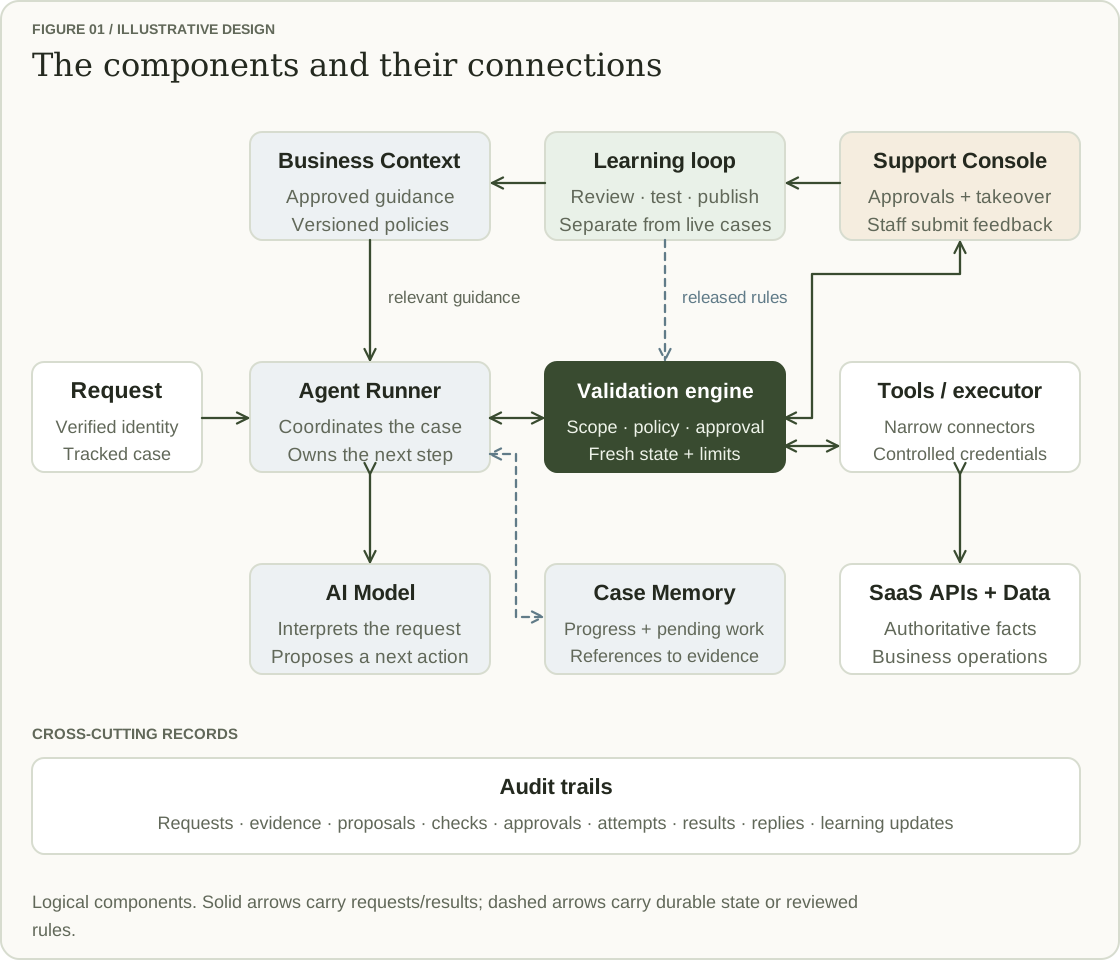
Validation: deciding what may proceed
A model can produce a well-formed refund request for the wrong payment. It can also read the policy correctly and still miss that someone has already issued a refund. A prompt telling it to be careful doesn’t remove either problem.
The validation engine is application code that checks a proposal against trusted account context, current records and business rules. It needs to sit on every execution path, including reads and customer replies. Fetching another customer’s invoice would already be a failure, even if the agent never changed anything.
For a $40 refund, the model might return:
{
  "action": "refund_payment",
  "payment_id": "pay_42",
  "amount_minor": 4000,
  "currency": "USD",
  "reason_code": "eligible_refund"
}
The amount is in cents. Before accepting it, validation checks that pay_42 belongs to the verified account and tenant, that the refund policy applies, and that $40 remains refundable. The account scope comes from the signed-in session. An account ID typed into the chat has no authority to change it.
The action also has to be permitted. In this design, reads, approved factual replies and a small allowlist of low-risk profile edits can run automatically. Refunds, plan changes and other permitted account edits need human review. Sensitive identity and security changes stay with specialist workflows.

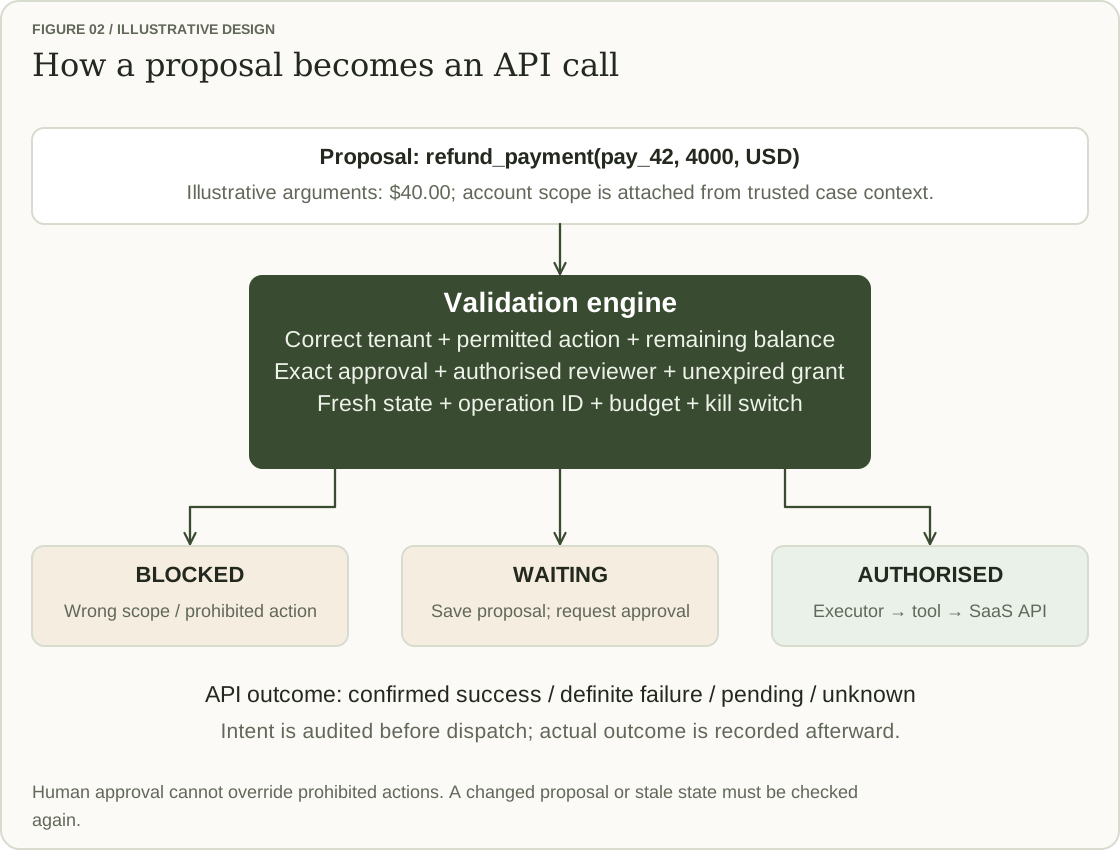
A reviewer approves the exact payment, amount and currency shown in the console. If the proposal changes from $40 to $60, it needs another review. Approval can’t override a prohibited operation, and it doesn’t freeze the payment record while the agent waits.
That’s why validation runs again before dispatch. It checks the reviewer’s authority, approval expiry, policy and current payment state, along with the case’s execution budget and any active kill switch. The business API still needs its own rules and concurrency controls, since a support person could act on the payment between the agent’s check and its write.
Keeping tools narrow makes these rules enforceable. A refund_payment tool has arguments the application can inspect. A generic tool that can call any URL or update any field makes that boundary much harder to maintain.
Memory: picking up where the case stopped
Waiting for approval creates a practical problem: the worker handling the case may be gone by the time someone responds. A new worker needs to know which proposal was approved and which steps are still unfinished.
Case Memory stores that progress. For the refund, a checkpoint might look like this:
case: case_108
state: WAITING_FOR_APPROVAL
proposal: refund-v1
payment: pay_42
operation: op_18
refund: not_dispatched
customer_reply: not_sent
policy_used: refunds-v3
The runner resumes from this checkpoint. It also retains the customer’s clarifications and references to facts already fetched, so another model call can build on the work done so far. Tool attempts, model calls, time and cost remain attached to the case; restarting a worker shouldn’t reset its budget.
Saved facts can go stale. Memory tells the runner where it left off, but the payment API must tell it how much is refundable now. If support issued the refund while the agent was waiting, the saved proposal must be checked against that new state.
Audit trails: establishing what happened
Suppose the customer comes back asking where their refund is. The chat contains a promise, the reviewer approved $40, and the API call timed out. None of those facts alone establishes whether money was refunded.
The audit trail gives support a history they can follow: the payment facts and policy version used, the proposal, the checks, who approved which arguments, the dispatch attempt and the API result. Records should carry timestamps and case, proposal and operation references so these events can be connected.
Save the intended action and authorisation before dispatch, then append what happened. A timeout should remain recorded as an unknown outcome. If a later lookup confirms the refund, add that evidence to the history.

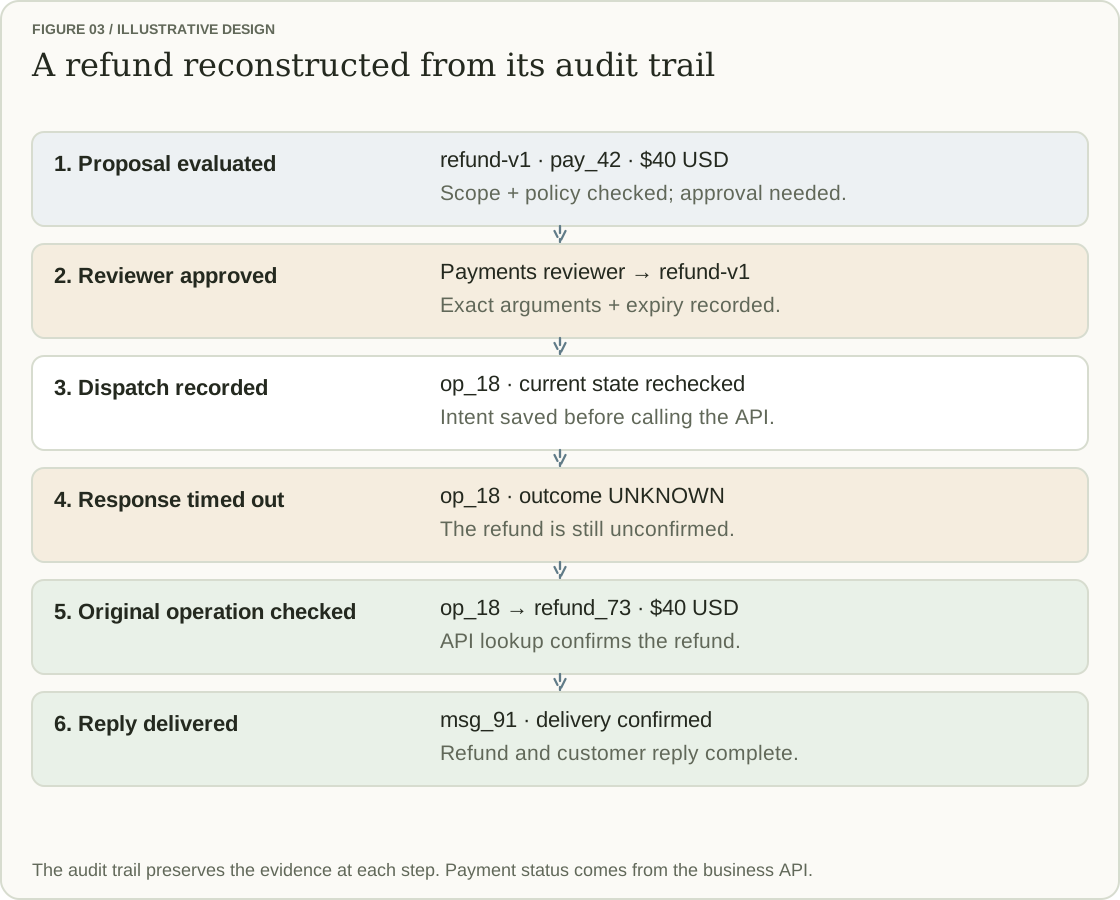
This history helps recovery as well as investigation. If the payment API confirms the refund but the customer message fails, only delivery is unfinished. The runner can retry the message with its own duplicate protection. It has no reason to issue another refund.
Memory holds the current working state. The audit trail preserves how the case reached it, including failed attempts and earlier decisions. Neither a model’s success message nor an approval should be treated as proof that the API completed the operation.
These records need restricted access and protection against alteration. Store the evidence needed to explain the action, with appropriate controls for sensitive data, rather than copying every customer payload into ordinary logs.
Learning: improving the next answer
Support will find questions the agent can’t answer. Once someone has resolved the case, they can submit the missing instructions through the console. A knowledge owner checks them and publishes a versioned update to Business Context.
That review matters because a solution for one customer may depend on their permissions, plan or account state. The reusable guidance needs to explain those conditions and leave out customer-specific details.
“Learning” here means updating reviewed guidance. There’s no automatic model retraining after a conversation. Changes to what the agent may do need their own policy review, validation tests and release. A new help article shouldn’t quietly grant permission to move money.
Four requests through the system
1. “When does my subscription renew?”
The customer is signed in, and validation permits an account lookup. The API returns the Pro plan and a renewal date of 15 November.

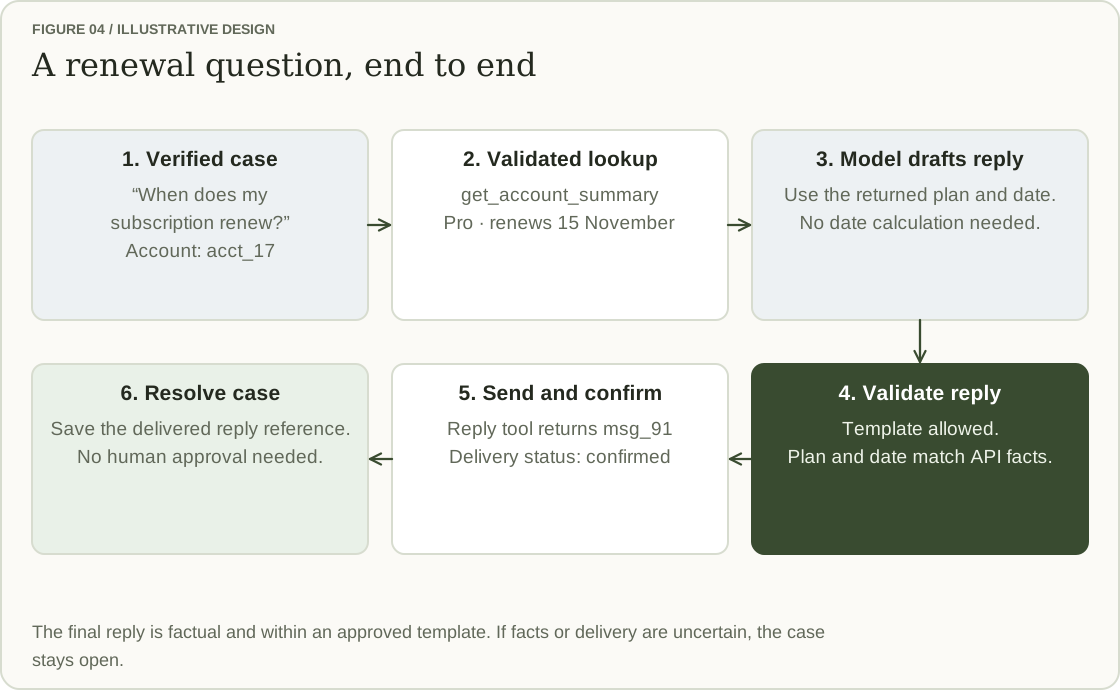
The model drafts “Your Pro subscription renews on 15 November.” A reply this simple can use an approved template. Validation compares the plan and date fields with the API response, then the template renders the final message. Free-form advice needs a different review path.
The reply tool sends it, and the audit trail records delivery. Once delivery is confirmed, the runner closes the case. A failed or uncertain send stays open.
2. “What is the extra $15 on my invoice?”
The account summary shows an extra $15 with no explanation. The billing guidance says upgrades can create prorated charges, so that’s one possibility. The agent still needs to check this invoice.
On the first model call, it proposes fetching invoice lines and recent plan-change history. Those reads pass through the same account-scope checks as the original lookup.

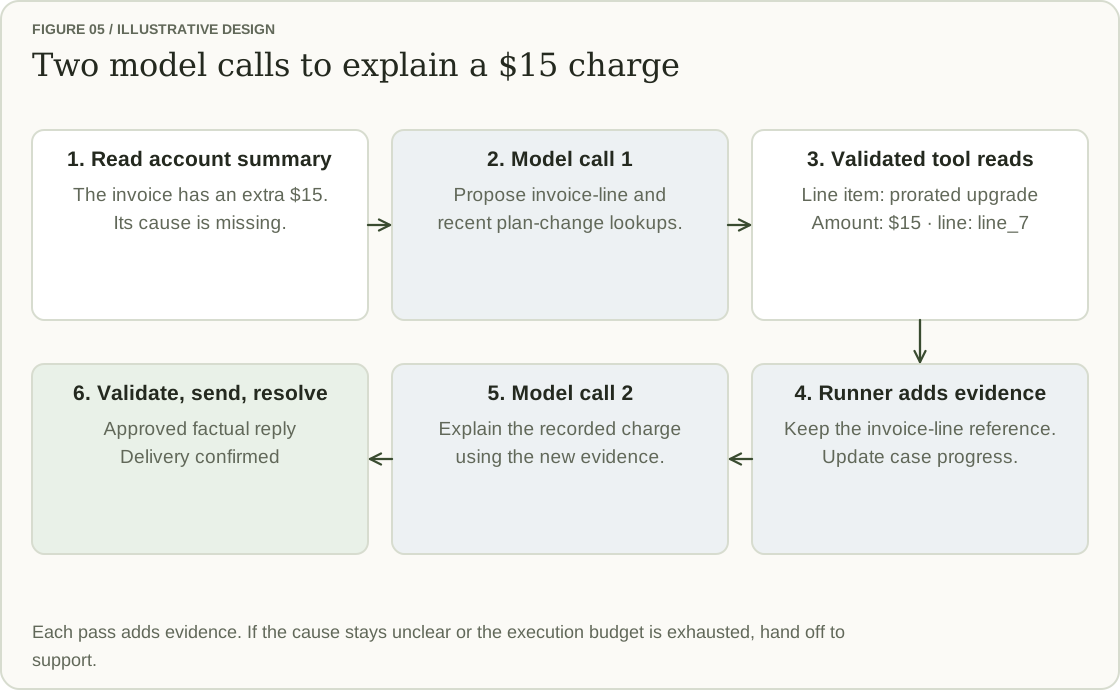
Suppose the lookup returns:
invoice_id: inv_83
line_id: line_7
description: Prorated upgrade to Pro
amount_minor: 1500
currency: USD
The runner saves the line reference, adds the result to the context and makes a second model call. Now the reply can explain the $15 charge using the billing record. Validation checks the factual reply before it is sent.
If the line still doesn’t explain the charge, the runner can gather more information within its budget or hand the case to support with the evidence collected so far. Repeatedly asking the model the same question won’t fill the gap.
3. “Please refund my recent $40 payment”
Assume the policy permits the refund and the payment API confirms that pay_42 has $40 available, with no previous refund in its history.
The model proposes the operation shown earlier. Validation confirms eligibility but requires approval. The runner saves refund-v1, enters WAITING_FOR_APPROVAL and sends the proposal to an authorised Payments reviewer.

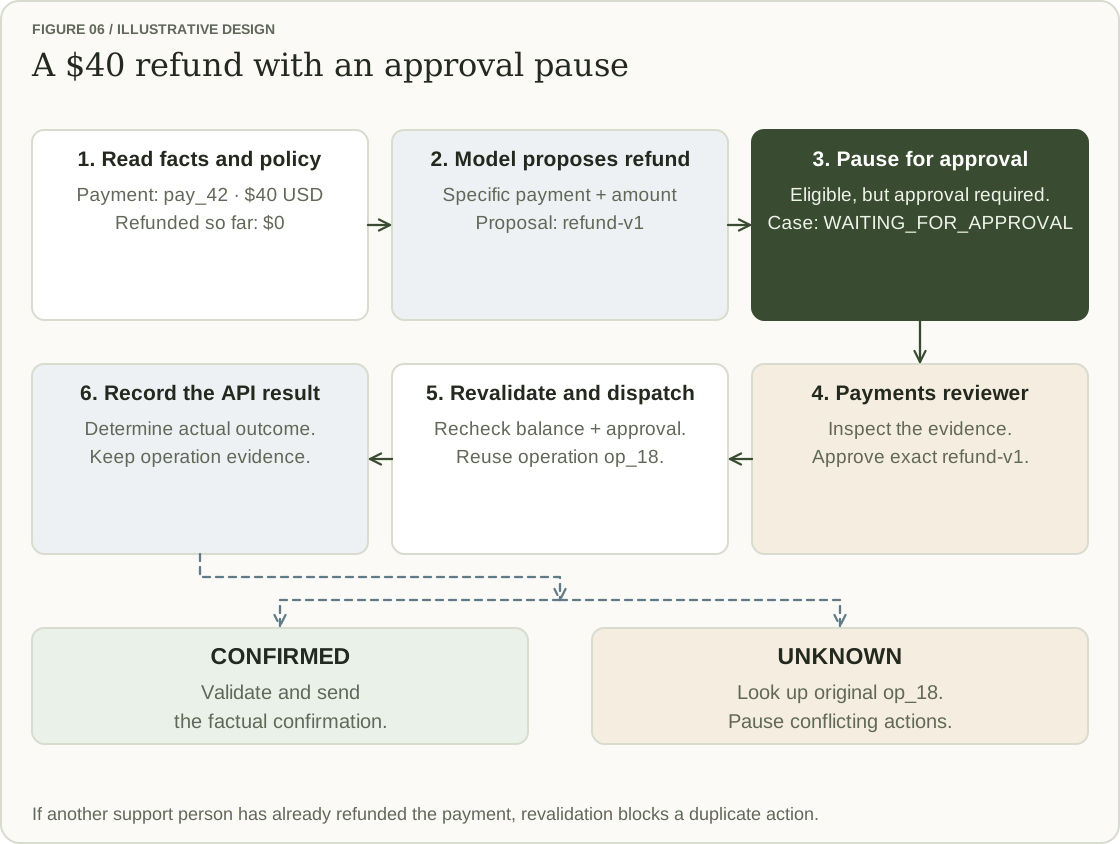
Once approved, the runner resumes, revalidates and dispatches the operation using op_18. Any permitted retry uses the same idempotency key, provided the downstream API supports that duplicate protection.
Two things can change the outcome:
- Support has already refunded the payment. A fresh lookup shows no refundable balance, so validation blocks the queued proposal. The business API’s concurrency controls must also protect against two callers trying to refund it at once.
- The response is lost. The runner records an unknown outcome and queries the original
op_18, following the audit sequence above. It pauses conflicting actions while it establishes what happened.
The agent sends a refund confirmation only after the payment records show that it happened. If the outcome stays unknown, support gets the operation reference and details of the attempt. The case remains open until the refund outcome and customer reply are settled.
4. “How do I export reports from an archived project?”
Suppose the feature exists, but the approved documentation doesn’t explain it. The runner searches Business Context and comes back without usable instructions.
The model proposes a handoff. The runner includes the question and the gap it found, and waits for support to accept ownership. Someone checks the actual workflow and answers the customer.

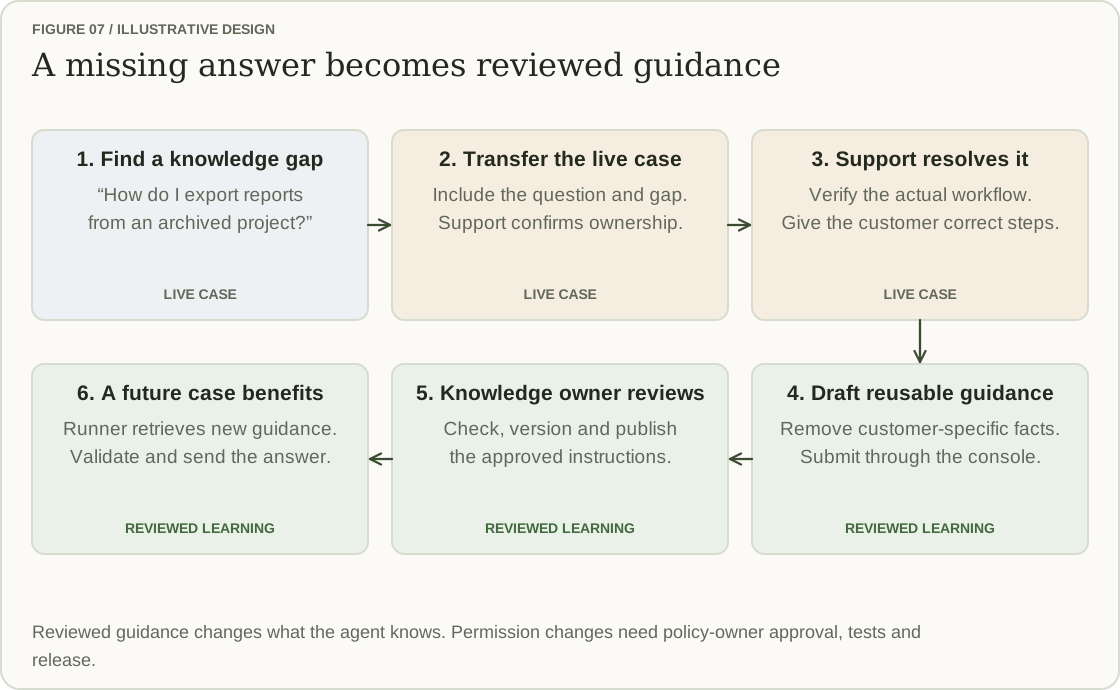
Support can close the case at that point. The documentation fix is separate work: submit the instructions, remove customer-specific details, and have a knowledge owner check and publish them.
The next customer’s case can use those approved steps. The answer still goes through the usual response checks, and the guidance version used becomes part of its audit history.
When something fails
The refund timeout is one kind of failure. The API might also reject an operation, leave it pending, or complete the refund while message delivery fails. Recovery needs to start with the status of each step: completed, failed, pending or unknown.
The support console should show that status alongside the evidence, a responsible owner and the next action. The customer gets an update based on confirmed facts. “We’re checking the refund status” is appropriate while an outcome is unknown; “Your refund failed” may be wrong.

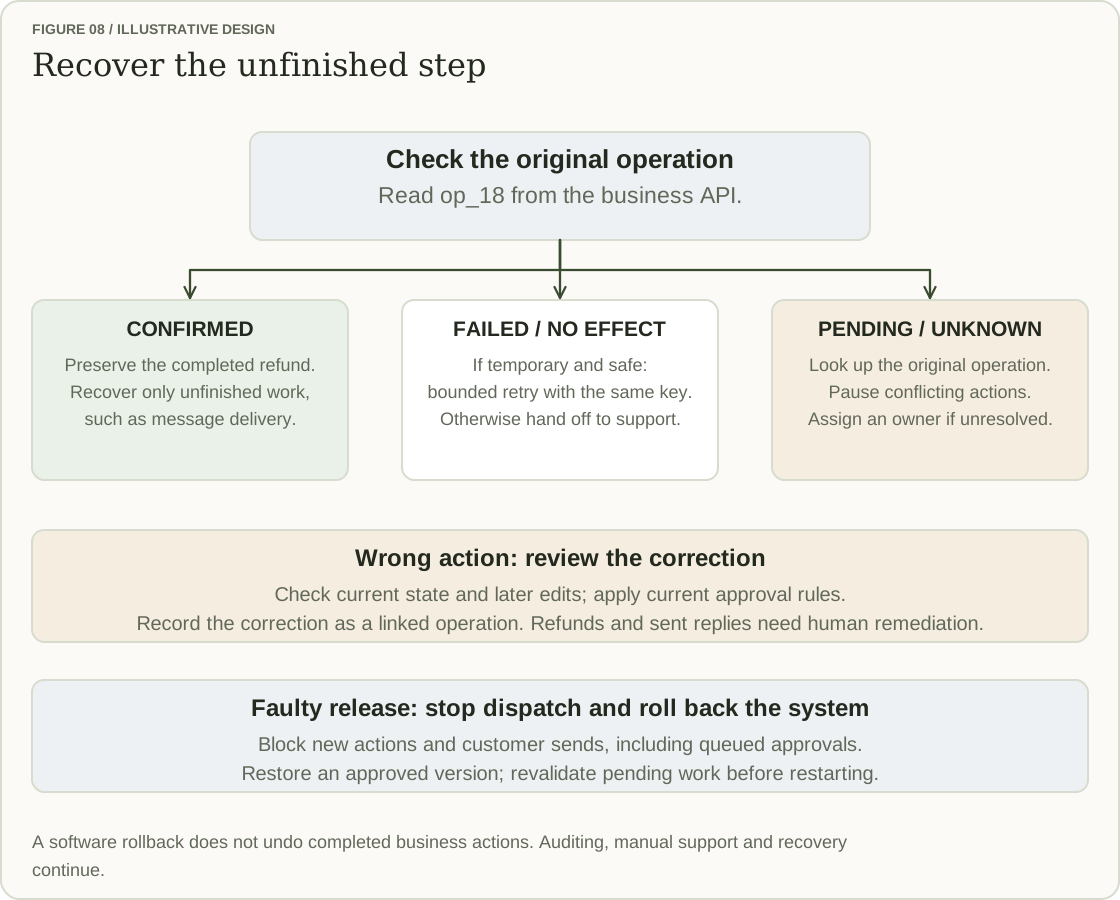
Retries need a reason and a limit. A temporary failure can be retried when repetition is safe, using the original operation ID and idempotency key. The downstream API must actually support that duplicate protection. A pending or unknown result calls for a status lookup first. If it can’t be resolved, pause conflicting actions and assign someone to investigate.
A wrong action is a different problem. Suppose the agent changed a display name incorrectly. Before restoring the old value, check whether the customer has edited it since. Apply the current approval rules and record the correction as a new operation linked to the original. Otherwise, an attempted repair could overwrite a legitimate later change.
An issued refund or delivered message can’t be repaired by restoring a saved case snapshot. Support and Finance need to handle the appropriate remediation. The audit history should retain the original action and whatever was done to correct it.
If a release causes a critical safety violation or repeated faults, stop the affected capability—or all agent execution if needed. The switch must block new actions and customer sends, including work already approved and waiting in a queue. Manual support, auditing and recovery continue. Restore a previously approved system version where appropriate, then revalidate pending work before restarting. Rolling back the software doesn’t reverse completed business actions.
Guardrails the teams share
Payments and Accounts may own different tools, but they need the same validation, approval, execution and audit controls. Both must enforce tenant boundaries, coordinate with console actions and respect the same budgets and kill switches. Only the controlled executor holds the agent’s API credentials. An older helper with a direct path to an API would leave a hole in that design.
Each tool needs a written contract: allowed inputs and customer scope, preconditions, approval requirements, limits, possible outcomes and recovery behaviour. It also needs an owner who knows how to stop it and handle a failed operation. Shared owners maintain the common controls; domain teams own their tools, rules and recovery procedures.
Test the model’s decisions and the executor’s enforcement separately. Use ambiguous requests, attempts to bypass policy, another account’s identifiers, expired approvals, duplicate operations and changes made through the console. A persuasive request or a confident model response must still be unable to bypass the checks. Verify duplicate prevention and outcome lookup before enabling a tool that changes account data.
Prompts, models, policies, guidance and tools all need versioned changes and tests. Audit records should be append-only and tamper-evident, with access restrictions and encryption for sensitive data. Redact ordinary logs and agree retention with Finance and Legal. These controls give the team a usable history without turning every debugging log into a copy of the customer’s account.
Rolling out one capability at a time
I’d start with routine account questions, where the answer can be checked against a small set of fields. That gives the team a useful first capability and a manageable set of failure cases to investigate.
Run saved cases through offline tests first. In live shadow mode, the agent can propose what it would do while support handles the customer; it makes no account changes and sends no replies. Compare those proposals with the actual outcomes. Human-assisted operation comes next, with staff reviewing the proposed work before execution.

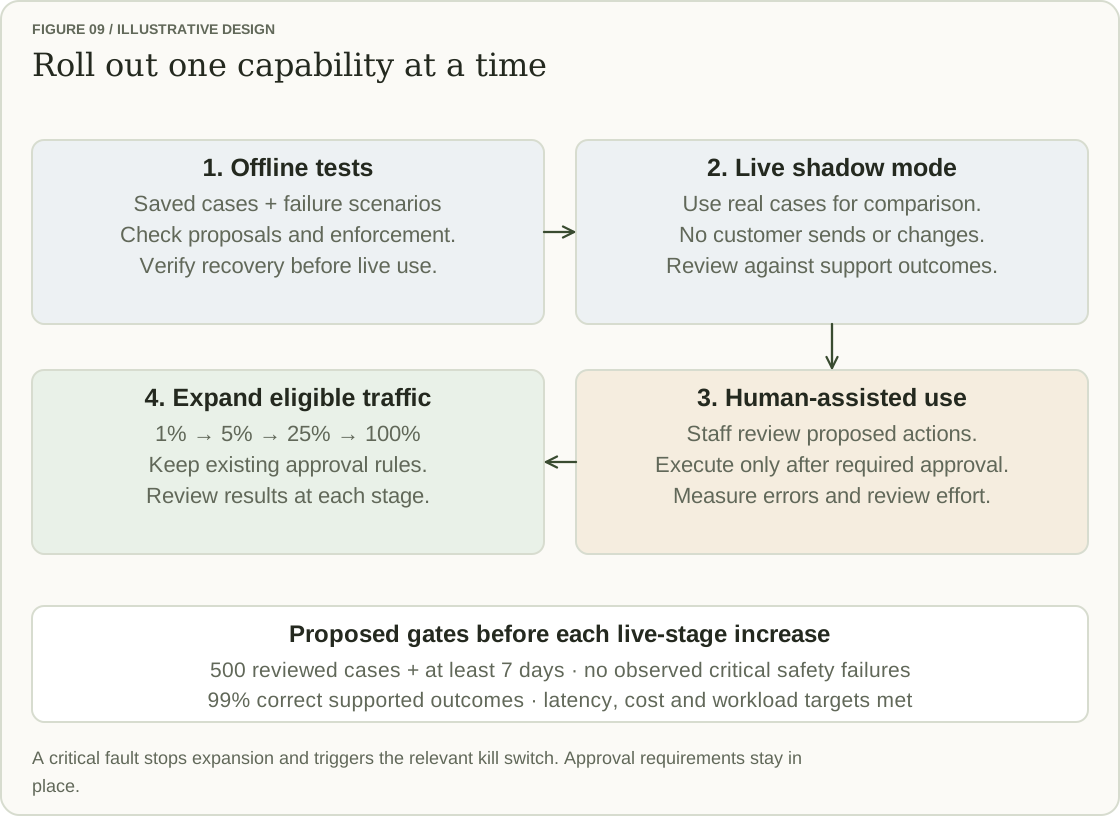
From there, increase coverage to 1%, 5%, 25% and eventually 100% of eligible traffic. Eligible means requests within the capability’s approved scope. Reaching 100% doesn’t remove approval requirements: refunds and plan changes still need a reviewer.
For this design, the proposed gate at each live stage is at least 500 reviewed cases and seven days, with no observed critical safety failures, 99% correct supported outcomes, and the agreed latency and cost targets met. Reopened cases and human workload should also be compared with a similar set of cases handled without the agent. Passing a correctness target doesn’t excuse a critical failure such as accessing the wrong account.
If the agent saves reply time but leaves support with more reopened cases and cleanup, the rollout hasn’t earned an increase. Investigate, adjust and review another sample. A critical fault triggers the relevant kill switch and recovery process.
Payments and Accounts should agree the shared contracts and controls before migrating their existing helpers, then move one capability at a time and remove paths that bypass them. Initial progress will be slower because reviews and integration take time. The decision to expand can then come from reviewed outcomes, rather than the number of tasks the model appears able to attempt.
Prompt, context and harness
The support agent in these examples depends on three things working together. The prompt defines the job. Context brings in the customer’s request, current account data, relevant guidance and case history. The harness—the code around the model—manages the workflow, controls tool access and enforces validation and approval rules.
Each solves a different problem. If the agent gives the wrong renewal date, we need to look at both its instructions and the data it received. If it repeats a refund after a timeout, we need to fix execution and recovery. More detailed instructions alone cannot make a payment operation safe to retry.
Building the agent means taking responsibility for all three. We can refine prompts and context as we learn from real cases. The harness must still check each proposed action, record what happened and preserve a way for someone to take over. That is what turns a useful model response into a support process the team can operate.
DID THIS RESONATE?
A little encouragement.
If something here stayed with you, leave a clap.
— claps
A little encouragement goes a long way.
KEEP THE CONVERSATION GOING
What’s on your mind?
A question, a different perspective, or a story of your own. I’d love to hear it.
The conversation
Loading the conversation…